Create a zip/rar file of your files and folders, or create a .iso image file of your data CD.
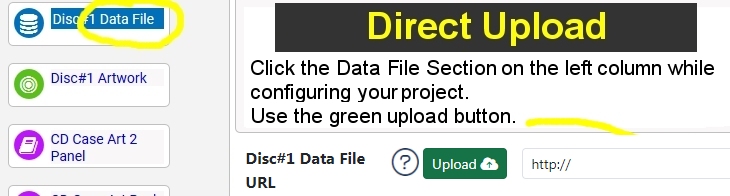
Upload the file directly to the TrepStar project. Before we burn the CD, we unzip your files.
Zip up your files and subfolders into a single .zip (or .rar) file. Each disc is a single .zip or .rar file. Before we burn the CD, we unzip the files first. Not sure how to zip up files? Learn More Or, create an .iso image file of your files or physical CD. You can make an .iso file from a CD or DVD. Not sure how to create an .iso file? Learn More You may also upload an .exe file. This is normally a windows setup file like setup.exe
1) You may upload your file directly to the TrepStar Project. Edit your project, click the green upload button, and select your file.
2) You may upload your file to your website, then edit the TrepStar project and type in the URL to that file on your server.
3) You may upload your file to a cloud service like Amazon S3. Make that file public, get the URL, then edit the TrepStar project and type in the URL to that file on your server. Learn More about Amazon S3
If you would rather skip the file preparation step, or want complete project setup support, you have a few options. Learn More