Steinberg’s Cubase Pro and Nuendo have supported up to third-order Ambisonics for a while now and I’m happy to finally add both DAWs to my Compatible Hosts list!
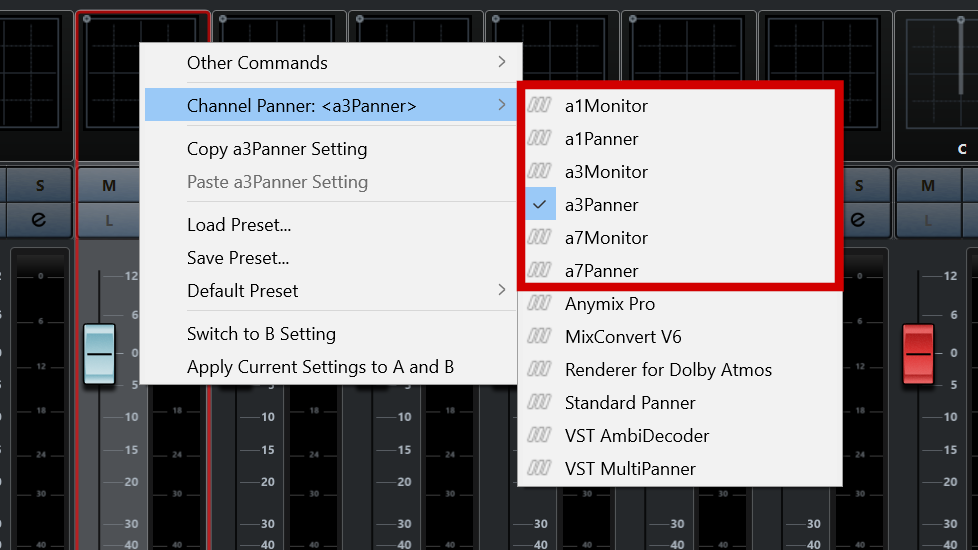
Most of the plugins already worked as Insert effects in Cubase and Nuendo Ambisonics tracks/buses. In the newest versions I have improved the integration of aXPanner and aXMonitor so that they can be loaded in the panner slot. This makes working with the aXPlugins in Cubase and Nuendo that little bit easier and more pleasant.
Now that these two plugins are fully compatible with Cubase/Nuendo Ambisonics tracks you can use the full aXPlugins chain from panning to playback in the most convenient possible way.
You’ve recorded your session with a mixture of Ambisonic microphones and some mono or stereo spot mics. You want to convert the spot mics to Ambisonics to place them spatially in your scene. Doing this in Cubase and Nuendo with aXPanner is really easy:
But with Ambisonics, panning is only half of the setup. We can’t listen directly to the Ambisonically encoded tracks. We need to decode it. Thankfully, that’s even easier than setting up the panner.
Now that you have your Ambisonic tracks (recorded or encoded/panned) you’re going to want to listen to them. The aXMonitor is here just for that.
The a1 and a3 versions of all plugins will work as intended in Cubase/Nuendo – you’ll get (up to) first and third-order processing respectively. All you need to do is add them to the tracks, as above.
The a7 versions of the plugins allow up to seventh-order processing but only if the DAW allows it. For the moment Cubase and Nuendo Ambisonics tracks are limited to a maximum of third-order (16 channels per track). The good news is that the VST3 format is run by Steinberg and it recently added native support for seventh-order Ambisonics! That means that hopefully in the near future we’ll see this work its way through to Cubase and Nuendo.
So, if you are a Cubase or Nuendo user you can add the aXPlugin suite to your tools for mixing Ambisonics and know that you’re getting a tight integration with your DAW. I would love to hear what you do with them, so please get in touch!