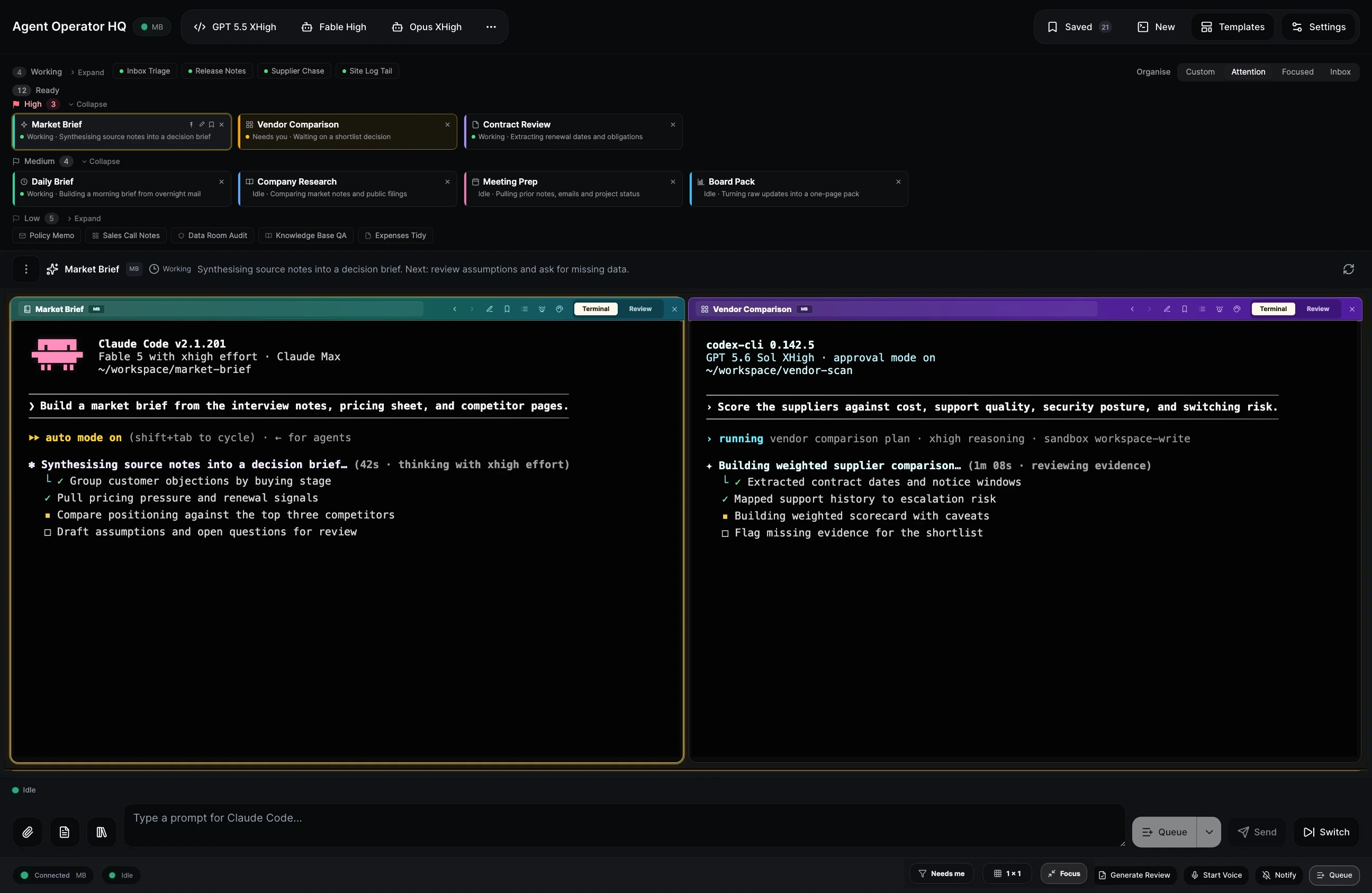
In April we wrote about Nature Work: Claude Code and Codex on your own machine, driven from your phone while you walk. That still works. What we didn't cover is the other half of the day, at a desk with a big monitor and a dozen sessions open. That half is Agent Operator HQ.
Nature Work and Agent Operator HQ run the same sessions on the same machine. Only the screen they expect differs.
Agent Operator HQ is the desk view: a full-screen terminal grid, session cards along the top, keyboard shortcuts, and the prompt queue below.
Nature Work is the phone, tablet and AR glasses view: big touch targets, voice input, gamepad control, one terminal at a time.
Raq.com remembers which face you were on, and offers to move you if you open the desk view on a phone. Both names appear in the sidebar and Cmd+K, and agents on MCP find either.
Nature Work was built when four agent sessions felt like a lot. We now run twelve or twenty. Past a certain number the only question is which one needs you next.
Every session carries a priority you set: high, medium or low. It's your triage, not a guess from activity, and medium is the default, so untriaged work never looks urgent.
Sessions ready for you split into three bands. Drag a card between bands to change its priority, or within one to reorder.
Each band remembers whether you left it open or shut. High and Medium show full cards; Low and Working collapse to pills, so ten idle sessions take one row instead of ten.
Priority survives a session dying and restarting. Set it from the card's flag, any terminal pane toolbar, or the AI title dialog, where each suggestion carries High, Med and Low buttons.
Tabs also stopped reordering by recent use, because nothing was ever where you last saw it. Opening a session leaves it put, new ones lead, and pinned stay first.
The Organise control above the session list has four options.
Custom is your own order. Drag sessions where you want them.
Attention groups by what each session is doing: Ready, Working, Background, and Ended or Offline. Ready holds the priority bands.
Focused shows one terminal and nothing else: no tabs, a one-sentence status, a Next button. While it's selected, Raq.com checks your sessions each minute and classifies each as needing you, blocked, apparently finished, or safe to close. Only those appear, so when nothing needs you the workspace stays empty.
Inbox turns the session list into a left sidebar of cards, each with a status chip, the session's summary, and one obvious action: Reply if it's waiting on a decision, View Review if a report is ready, Restart if it died, Open otherwise. Anything waiting on you also gets Defer 1h. It reads like an email inbox. It needs the width, so a phone falls back to Attention.
Cursor CLI now runs alongside Claude Code and Codex, with the same prompt queue, reviews, titles and status detection. Each CLI signals differently, so each is separate work: Cursor leaves the last submitted prompt in its composer after finishing, and its first-run trust dialog uses letter hotkeys, not a numbered menu. Both needed handling before the queue could drain unattended.
Both faces are one module and one toggle. Turn on Nature Work, run the one-line install on the machine your agents live on, and your sessions appear in the browser within a minute. Open Agent Operator HQ at your desk or Nature Work on your phone. Same list either way.
Agent Operator HQ and Nature Work are included with every plan. Start your free trial . No credit card required.