by Stuart Deavall | How To & Tips | 14 comments
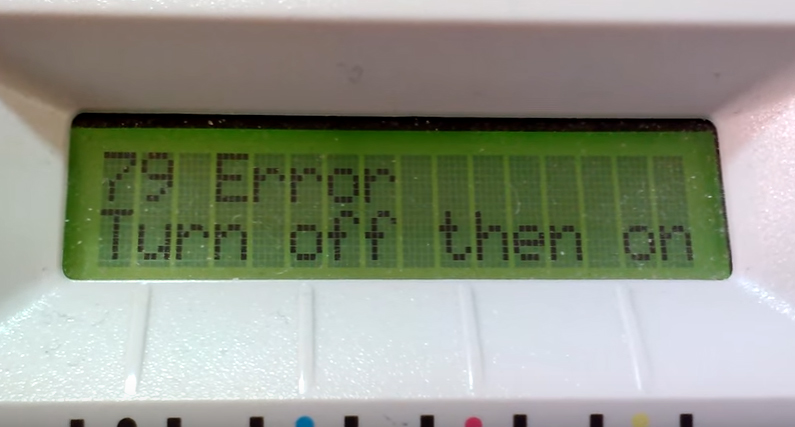
Are you wondering, ‘ what is a printer error 79 ?’. This is a common problem among many HP LaserJet printers such as the CP2025 usually caused by a bad print job. Despite the advice on the printer screen, turning the printer off and on does nothing and in fact the printer may reboot itself over and over on it’s own.
Don’t worry, many of our customers have asked us for advice on how to fix this annoying problem so we’re going to show you what to do in 4 easy steps ….
Firstly, why does this happen? Well ‘error 79’ usually occurs when you are in the middle of an important print job and normally means that you can’t go any further with your task at hand but there are a few simple reasons for this frustrating problem. Here’s why it happens:
Believe it or not some browsers can cause issues with certain printers when printing something from a website. You will likely find that you were printing from a web document or website and usually internet explorer when you experienced the Error 79. This is caused by the printer getting stuck in a loop after attempting to print from the encoding of the website.
This particular error code actually refers to an internal firmware error which in turn makes it difficult for the spooler and the printer to communicate correctly, allowing the printer to complete its task.
First of all, take a deep breath, step away from your printer for a few minutes and let the rage subside. Following these easy steps will have you up and printing again in no time at all:
Hopefully your printer will be up and running again, and you can get yourself a hard earned brew!
It could be that you need to update your printer firmware to get the spooler and the printer communicating correctly again.
Now you should be rocking and rolling! If not, try contacting HP support who will be more than happy to help or by contacting us in the comments below.
I have been working in the printing industry with TonerGiant for over 18 years, and I'm the resident technical printer expert, helping people fix their printer problems for over 16 years. I have taken part in many training courses with HP, Samsung, Brother, Canon and Xerox to further my knowledge, and I'm also the Digital Marketing Manager at TonerGiant.co.uk (degree qualified).
Deleting the job in the queue fixed it! Thank you!
Great news! Glad we could help 🙂
Yes – clearing the print queue on the offending PC cleared the problem – thanks
We have a few devices connected to the printer and deleting the Print Queue worked perfectly. Thank you.
HPcp2025 is printing a single yellow /red/black band into 4 equally spaced times through the full length of a sheet of paper
This could be due to a drum unit issue.
Gracias mi esposo y yo lo arreglamos
My HP Laserjet Pro 200 m251nw gives service error 79, Keeps recycling to this error and cant interrupt. Once in a while it stays and works for a few moments. Any fix?
The error refers to a problem with the DIMM memory chip. You can sometimes take them out and see if it works but I’m not sure where it would be located in your printer and you may need a technician to look at it.
Im still receiving error 79. Ive tried so many different things and nothing works. please help
Hi Sylvia, have you also tried to update printer drivers? It could be down to issues with the PC communicating with the printer software as well. You should be able to find up to date drivers by googling your printer model and ‘drivers’.
Thank you Stuart and Google! Posted 7 yrs ago and still works like a charm.
I spent 400 dollars on ne toner then it wouldn’t get passed the error I was a tad upset! These steps helped me thankyou
After trying everything, and wasting a ton of time (& getting very stressed), followed Stuart’s ‘4 simple steps’ (including opening the website with a different browser) & it not only worked liked magic – when everything else had failed – but also restored the printer to its original settings and operation. Am incredibly grateful. Thank you!
This site uses Akismet to reduce spam. Learn how your comment data is processed.