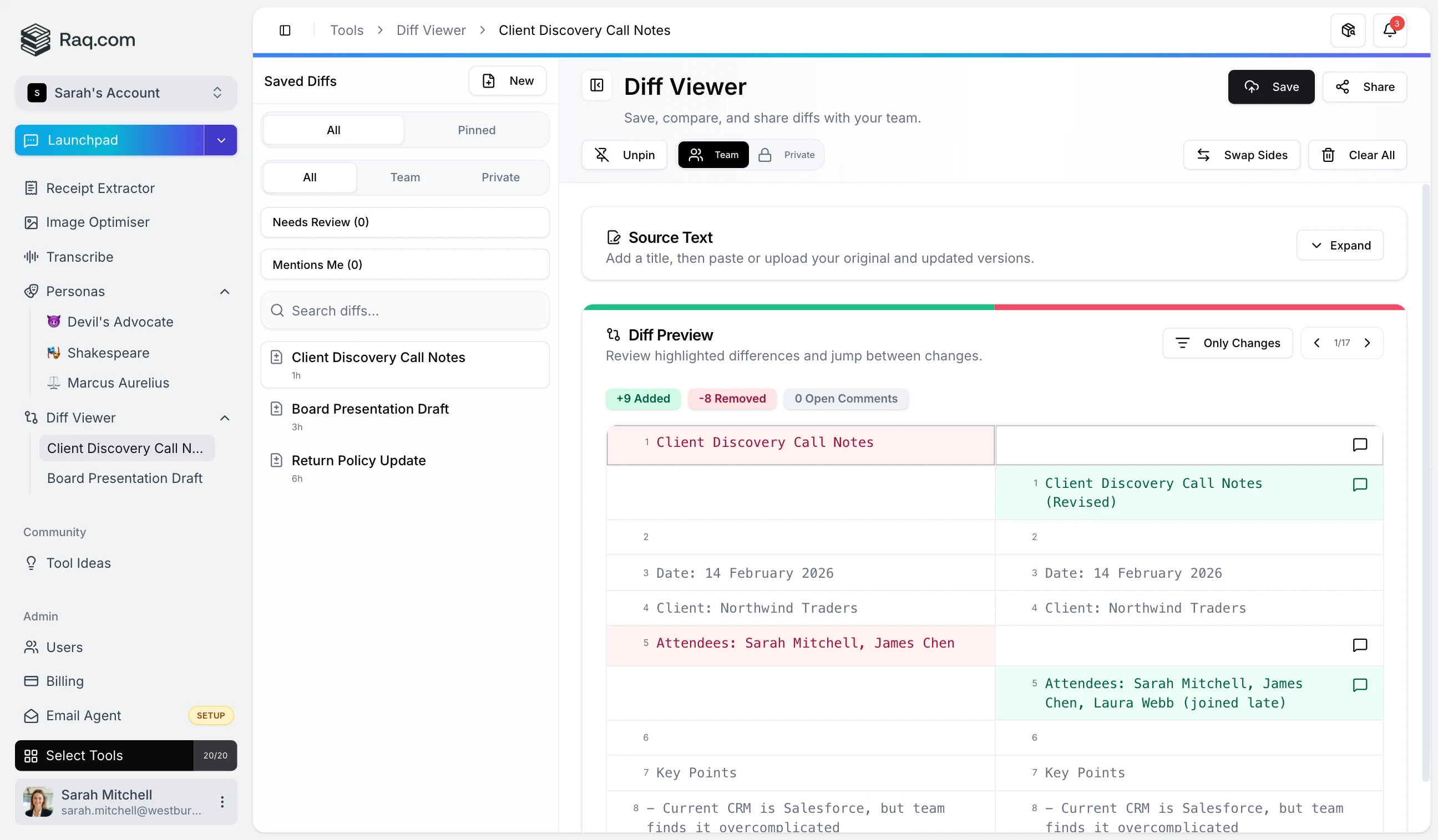
Paste two versions of any text and Diff Viewer highlights every change instantly. Red for removals, green for additions, and clear side-by-side layout so nothing slips through.
Paste your original text on the left and the updated version on the right. Diff Viewer compares them character by character and highlights every insertion, deletion, and modification.
Different tasks need different levels of detail. Switch between modes to get the view that fits:
View your diff in the layout that works best. Split mode shows both versions side by side. Unified mode interleaves changes in a single column. Or view the original and updated text on their own to read each version cleanly.
Click any highlighted change to leave a comment. @mention teammates to pull them into the conversation. Mark comments as resolved when the feedback has been addressed. It turns a static comparison into an active review.
Save any diff as a snapshot. Pin important ones to the top of your sidebar. Toggle visibility between private and team-wide so you control who sees what. Every snapshot keeps the full original and updated text, so you can always come back to it.
Generate a share link and send it to anyone who needs to review the changes. They get a read-only view of the diff with all the highlights intact. No account required.
Diff Viewer fits anywhere you need to compare two versions of text:
Diff Viewer is included in your Raq.com subscription.
Start your free trial . No credit card required. Open Diff Viewer from your dashboard and paste your first comparison.