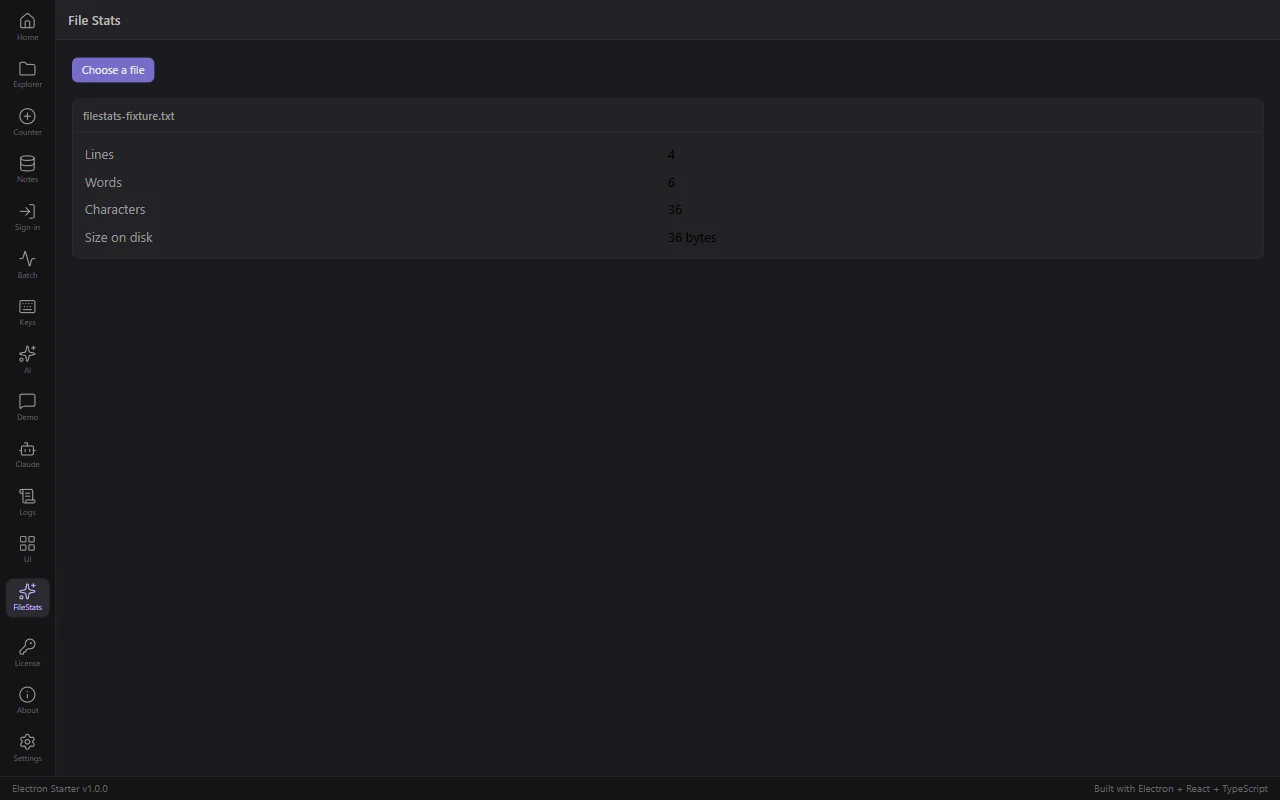
You are going to add a File Stats screen: the user picks a text file, and the app counts its lines, words and characters. Small on purpose, and it touches every layer you will use for the rest of your project.
You will not type this feature. You will describe it, then check what came back. Everything below was run exactly this way before it was published.
Two commands, one prompt, four checks. The only thing you need to know before starting is that an Electron app is two programs, and file reading belongs in one of them: the main process , not your React code. Your agent already knows that rule because CLAUDE.md states it. The full version is at the bottom of this page, once you have something running to attach it to.
Run these two yourself. They take a second each, and they are what keep your agent on the same pattern every time.
The first creates the screen folder and registers it, so a FileStats entry appears in the sidebar without anyone editing the sidebar. The second writes the channel name, the request and response types, a validation schema, an empty main-process handler, the preload bridge and the renderer types: eight files of wiring, no logic.
The channel name format is strict
It must be lowercasedomain:action . FileStats or fileStats:analyze both fail with Use lowercase domain:action format (e.g., demo:ping) . Use filestats:analyze .
In this Electron template I just ran npm run new:feature FileStats and npm run new:ipc filestats:analyze . Fill them in so the screen has a button that opens a native file picker, and the main process reads the chosen text file and returns its line, word and character count plus the file size.
Follow the patterns in this repo rather than inventing new ones: real request and response types in src/shared/ipc/types.ts , a Zod schema in src/shared/validation/ , the file read in the main process only, and the existing components from @shared/components for the UI. Cap the file size and handle a cancelled dialog.
Run npm run typecheck before you tell me it is done.
That last line matters. CLAUDE.md lists "claiming work is done before testing it" as mistake number 12, and asking for the typecheck is how you hold it to that.
You are looking for six files, and their locations are the point. If your agent produced a different shape, that is worth a follow-up prompt rather than a shrug.
Three things to look at specifically, because they are what a rushed answer gets wrong:
The file read has to happen in the main process only, the Zod schema must describe the real payload instead of an empty object, and every failure path should return { success: false, error } rather than throwing. Fix those and re-run npm run typecheck .
npm run dev is still running, so the screen is already there. Click FileStats in the sidebar, choose a text file, and read the numbers.
Check the numbers against a file you can count by hand. A file containing exactly alpha beta gamma , delta epsilon , zeta and a final newline is 6 words and 36 characters. Line count is legitimately ambiguous with a trailing newline, so 3 or 4 are both defensible; anything else is a bug.
Now that you have it running, the idea behind the checks is worth two minutes.
They talk over named channels, and every message is checked on the way through by the Zod schema you looked at in step 3. That check is why a mistake in the UI cannot become a mistake that deletes files, and it is why "nothing in src/features/ imports fs " was worth verifying rather than trusting.
CLAUDE.md states this as the first of its 6 hard architecture rules, which is why your agent followed it without being told. In an empty Electron project there is nothing to state it, and the same request produces UI code that reads the disk directly: it works on your machine, and it is the wrong shape to build fifty features on.
These are real compiler errors this walkthrough produced, and each one is the strict setup refusing a shortcut. If your agent hits them, it will usually fix them itself. If you see them, this is what they mean.
Property 'variant' is missing ... but required in type 'ButtonProps' Button requires variant . It is variant="primary" or variant="secondary" .
Property 'title' does not exist on type 'PanelProps' Panel calls it header . The agent guessed at an API instead of reading the existing one.
Type 'string | undefined' is not assignable to type 'string' noUncheckedIndexedAccess is on, so filePaths[0] is possibly undefined even after a length check. Destructure it and check the value.
None of these reach a user. That is the whole point of them.
Every future feature is these same steps: two generator commands, one prompt, four checks, one run. We tested that claim rather than making it. The same request, given to Claude Code three times in this repo, touched the same thirteen files every time and wrote a unit test each time without being asked. In an empty Electron scaffold the same agent invented a different layout on all three attempts and wrote no tests at all.
Following the exact pattern in src/features/file-stats/ , add a feature that reads the user's clipboard and shows the ten most frequent words. Use npm run new:feature and npm run new:ipc first, keep the work in the main process, and run npm run typecheck before telling me it is done.
Next: Package a Real Installer .