By the end of this page the full product is running on your machine: API, MCP server, background worker, Postgres, and Redis. You will not install Python. Docker does everything.
Open a terminal in your code folder (in Windows Explorer: right click the folder → "Open in Terminal").
Windows (PowerShell):
The script creates your .env config file, generates real secret keys, builds the Docker images, starts 5 services, and waits until the app answers. First run builds everything and takes a few minutes. After that it's about a minute: our measured fresh-clone run was 58 seconds from clone to healthy.
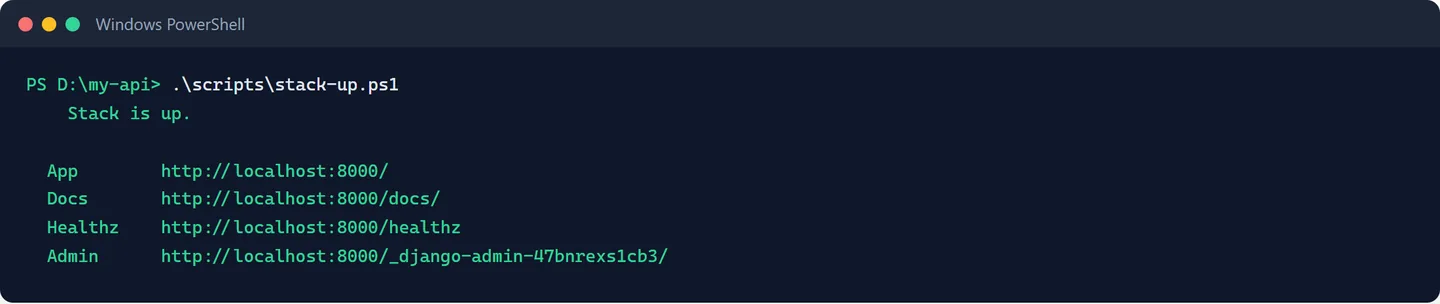
When it finishes you get this, and the four addresses are the whole product:
Windows says 'running scripts is disabled'?
Run this once in the same terminal, then retry: Set-ExecutionPolicy -Scope Process -ExecutionPolicy Bypass
If the script fails with Bind for 0.0.0.0:8000 failed: port is already allocated , something else on your machine uses port 8000. Open .env , add a line WEB_PORT=8010 , and run the script again. Everything adapts automatically. ( docker ps shows you which container holds a port when nothing else seems to.)
When the script prints its green summary:
The site says {{APP_NAME}} everywhere. That placeholder is intentional. Renaming it is a 2-minute step in Make It Yours .
This creates two plans, a demo user, sample logs, and prints a demo API key exactly once . Copy that mcpsk_... key somewhere: the next pages use it.
That response travelled through the real production plumbing: request logging, rate limiting, the works.
Why 127.0.0.1 and not localhost?
In browsers, use either. In terminal commands we always write 127.0.0.1 because on some Windows machines localhost resolves in a way that hangs command-line tools. Same address, fewer surprises.
The product uses magic-link login. On the login page, enter [email protected] . In local mode the email isn't sent, it's printed to the app's log:
Find the line with the magic link, paste it into your browser, and you're in the demo user's dashboard.
The red 'credits running low' banner is expected
seed_demo gives the demo user sample traffic and a zero balance, so the low-credit warning is showing you a working feature rather than a broken setup. You grant yourself credits in Charge Credits For It .
Next: Open It in Claude Code .