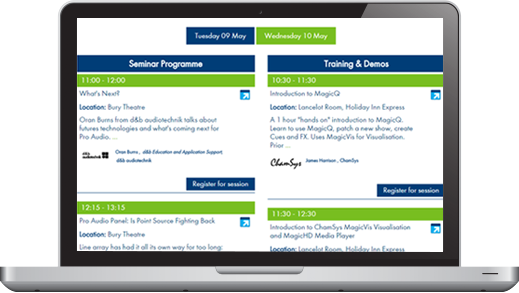
Conference Management System (COMS)
Conference management system is a web-based solution for comprehensive event planning and creation of detailed agenda. It assists organisers to manage delegate registration, payment collection, paper submission, review and the book of abstracts. Our conference Management System is designed specifically to meet the needs of conference organisers empowering them with the best of tools and interactive features for a smooth and hassle-free experience. Our team includes experienced designers, programmers and web developers. We've been there and we know what works.
Key Features of the System Works entirely online on our servers Suitable for all type of events Multilingual Full access control for organizers Powerful data export and import Reliable and secure system Creation of the detailed agenda, as well as an overview, based on accepted presentations, assigned topics and resources Manage resources (rooms, time slots) Tabular overview of the agenda Detailed list of presentations with locations and timing Speaker List with their bio and images
Works entirely online on our servers Suitable for all type of events Multilingual Full access control for organizers Powerful data export and import Reliable and secure system Creation of the detailed agenda, as well as an overview, based on accepted presentations, assigned topics and resources Manage resources (rooms, time slots) Tabular overview of the agenda Detailed list of presentations with locations and timing Speaker List with their bio and images
Works entirely online on our servers
Suitable for all type of events
Full access control for organizers
Powerful data export and import
Creation of the detailed agenda, as well as an overview, based on accepted presentations, assigned topics and resources
Manage resources (rooms, time slots)
Tabular overview of the agenda
Detailed list of presentations with locations and timing
Speaker List with their bio and images
Benefits COMS non-invasive ability gives users a hassle free experience. Works well across all browsers without the need to change browser settings. Can handle large data submissions Installation is multilingual- English, German and French. Other non-European languages can also be added, with translation supplied by the organizer Text displayed on COMS can be easily edited by the organizers Features for Chair and Administrators Configure all system and manage all days program Enable one or several of the interface languages (monolingual or multilingual mode) Configure the welcome page, programs for all days with time slots in separate sessions Configure templates for automatic confirmation emails View the details of all registrations received for each sessions individually Add/modify/delete speakers and update in their respective sessions View and change the details of any sessions for any day at any point of time Download the files of submitted papers from the Admin control panel View the results of the people registered for each sessions View statistics about participants and paper submissions
Benefits COMS non-invasive ability gives users a hassle free experience. Works well across all browsers without the need to change browser settings. Can handle large data submissions Installation is multilingual- English, German and French. Other non-European languages can also be added, with translation supplied by the organizer Text displayed on COMS can be easily edited by the organizers
COMS non-invasive ability gives users a hassle free experience. Works well across all browsers without the need to change browser settings. Can handle large data submissions Installation is multilingual- English, German and French. Other non-European languages can also be added, with translation supplied by the organizer Text displayed on COMS can be easily edited by the organizers
COMS non-invasive ability gives users a hassle free experience. Works well across all browsers without the need to change browser settings.
Can handle large data submissions
Installation is multilingual- English, German and French. Other non-European languages can also be added, with translation supplied by the organizer
Text displayed on COMS can be easily edited by the organizers
Features for Chair and Administrators Configure all system and manage all days program Enable one or several of the interface languages (monolingual or multilingual mode) Configure the welcome page, programs for all days with time slots in separate sessions Configure templates for automatic confirmation emails View the details of all registrations received for each sessions individually Add/modify/delete speakers and update in their respective sessions View and change the details of any sessions for any day at any point of time Download the files of submitted papers from the Admin control panel View the results of the people registered for each sessions View statistics about participants and paper submissions
Configure all system and manage all days program Enable one or several of the interface languages (monolingual or multilingual mode) Configure the welcome page, programs for all days with time slots in separate sessions Configure templates for automatic confirmation emails View the details of all registrations received for each sessions individually Add/modify/delete speakers and update in their respective sessions View and change the details of any sessions for any day at any point of time Download the files of submitted papers from the Admin control panel View the results of the people registered for each sessions View statistics about participants and paper submissions
Configure all system and manage all days program
Enable one or several of the interface languages (monolingual or multilingual mode)
Configure the welcome page, programs for all days with time slots in separate sessions
Configure templates for automatic confirmation emails
View the details of all registrations received for each sessions individually
Add/modify/delete speakers and update in their respective sessions
View and change the details of any sessions for any day at any point of time
Download the files of submitted papers from the Admin control panel
View the results of the people registered for each sessions
View statistics about participants and paper submissions