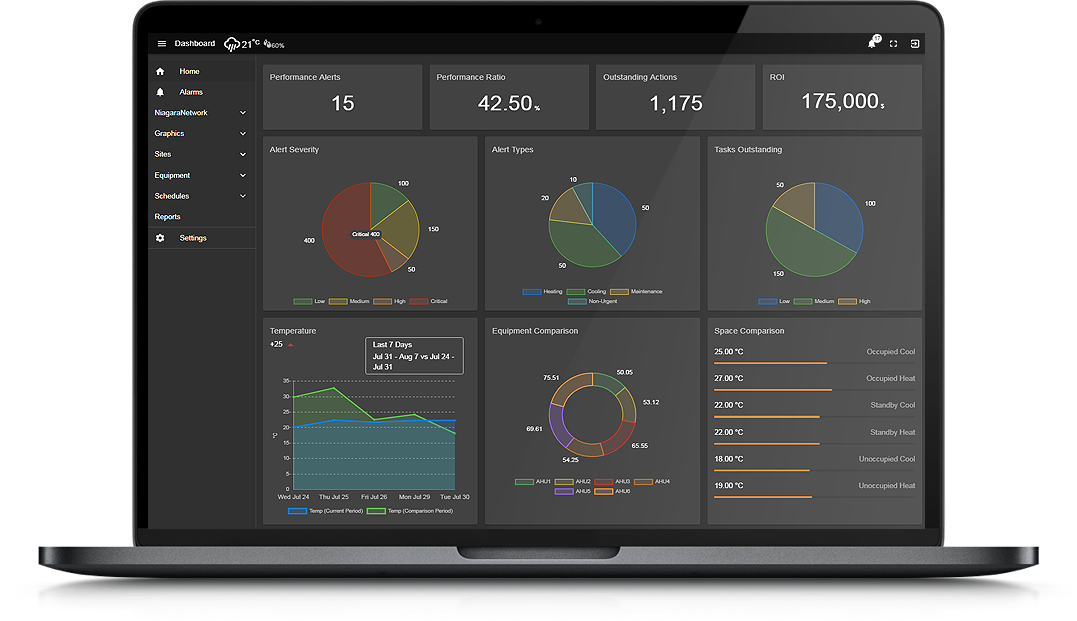
N4 View Builder™Â©ï¸ allows you to build custom dashboards by dragging n' dropping widgets into tab or grid style interface. This product also includes Scheduling View , Energy View , PX View , Alarm View , Floorplan Zoning/CCTV/Equipment View , Hyperlink Widget , Material UI Buttons , N4 Insights ™© , N4 Analytics Charts, and a Free Weather Service which can be used on any project. The dashboard supports multiple languages just by the click of a button. Be sure to check out some Examples...
Additionally, turn your station into a digital signage display system. Show comfort levels, information, weather, announcements, analytics, videos, and loads more. Create slides by dragging n' dropping widgets onto different screen layouts. The screen changes automatically at a configurable interval.
N4 Analytics - if you have created station analytics using algorithms and tagging, data can be plotted onto charts for analysis. Export data in CSV format to further analyze data.
N4 Automated Reports - create daily, weekly, monthly automated reports. Drag n' drop histories, points, alarm tables, and other niagara objects onto email templates. Or use it for tenant billing purposes. Use the Report Builder to build a custom trend history report.
Tenant Billing - Aggregate meter histories using BQL, rollups, or logic on the wiresheet and schedule it to got out at the different periods. The template can be modified using N4 View Builderâ¢Â©. Change the look n' feel, logo, line items, tax rate, addresses. energy, water, or gas rates etc. It doesn't use any external api's, its all done in native Niagara. A PDF is sent to the tenant via the stations email service.
HVAC Image Finder - We offer you the base image, and customers have the option to purchase a complete set of animated graphics, cutaways, GIFs, and other enhancements for the selected equipment. Contact us for more details.
SQL Import - if you have exported data out to Microsoft SQL or MySql database servers, you can easily bring this back into View Builder via the charting widgets.
Are you looking for a cost effective way to manage and visualize data for all your customers? Why not have a look at View Builder ?
Here are some of the features in Verson 5:
Here are some of the features we're putting in the next release:
Got any feature requests? Drop us a message here
Choose a tab or grid style view. Then select a grid layout. Layouts automatically adjust to screen size. Standard and advanced layouts are included.
Drag n' Drop Widgets into the layout grid. Set widget properties like Ords, or colours. Widgets include graphs, charts, labels, images, points, gauges, data tables, and loads more.
Apply your View to station objects or folders. Data is retrieved automatically and updates in real-time. Alarm View, Scheduling View, and Floorplan Zoning/CCTV/Equipment Builder View are all included as standard.
Select from a number of widgets including, charts, graphs, labels, sliders, images, maps, toggles, and more being added every week.
Choose a Tab or Grid style view type, or both. Layouts are responsive and respond to different screen sizes.
Views are laid out in a grid style. Choose from multiple grid configurations. Standard and Advanced grid configurations included. Or create your own.
Transform your ideas and customer requirements into stunning visualization dashboards. Exceed your customer requirements and deliver a customizable dashboard that informs, engages, and drives business results. Send us the wireframe, sketched on paper, or good old MS Paint, and we'll turn it into a dashboard which you can use in our N4 View Builder Solution .
back to more dashboards...
Build Your Own dashboards and win Projects by showing data that increase value and reduces expenditure.
Home About Us Current Projects Affiliations Privacy Policy ECommerce Policy
View Builder IOT ™© Mobile Solutions N4 View Builder ™© Niagara PX Graphics
Software Development Consultancy Project Management Graphic Design Knowledge
T: +44 (0)800 511 8446 (UK) +1 888 207 4061 (US)
Copyright © 2026 Works Software & Engineering Ltd. All rights reserved.