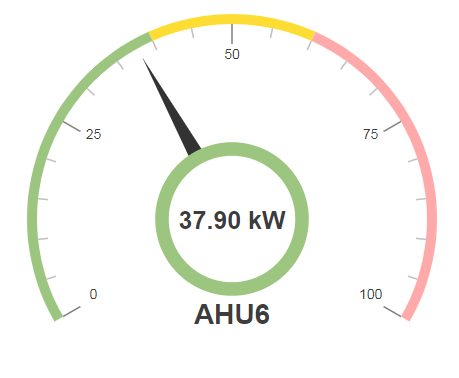
A circular spectrum gauge for Niagara 4. Includes main gauge value and 2 extra markers, e.g Peek Value and Last Month Peek. Set ord binding in widget properties. You can bind this widget to a numeric, numeric writable or a history. Change the spectrum bindings for different colour segments.
Are you looking for a cost effective way to manage and visualize data for all your customers? Why not have a look at View Builder ?
Before you start. Download the modules from our portal (see your order confirmation, which also explains licensing). Copy the modules file to your modules directory. Restart BOTH station and Workbench.
1. Copy the circularGauge-ux.jar file to your modules directory. 2. Open the module from your palette file. 3. Drag and drop the widget from the palette onto your px view.
The gauge has a number of configurable properties that can be used to modify look, feel, and functionality. Change the properties as required.
There are 3 ord references.
1. Main Gauge Value - this is the live value of the meter or the main meter value. The ord reference should be a numeric point, numeric writable, or a history that returns a single row.
2. Last Months Value - for example last months power value, the ord reference should be a numeric point or numeric writable.
3. Current Months Peek Value - the ord reference should be a numeric point or numeric writable.
Changing Widget Properties - most properties are self-explanatory but some require some explaining.
Min/Max - change the min/max, you need to modify 3 properties: min, max, major, and minor properties so it marries up nicely. E.g. Min = 0, Max = 100, Major Ticks = 0, 250, 500, 750, 1000, Minor Ticks = 0, 50, 100, 150, 200, 250, 300, 350, 400, 450, 500, 550, 600, 650, 700, 750, 800, 850, 900, 950, 1000 will produce:
back to more widgets...
Build Your Own dashboards and win Projects by showing data that increase value and reduces expenditure.
Home About Us Current Projects Affiliations Privacy Policy ECommerce Policy
View Builder IOT ™© Mobile Solutions N4 View Builder ™© Niagara PX Graphics
Software Development Consultancy Project Management Graphic Design Knowledge
T: +44 (0)800 511 8446 (UK) +1 888 207 4061 (US)
Copyright © 2025 Works Software & Engineering Ltd. All rights reserved.