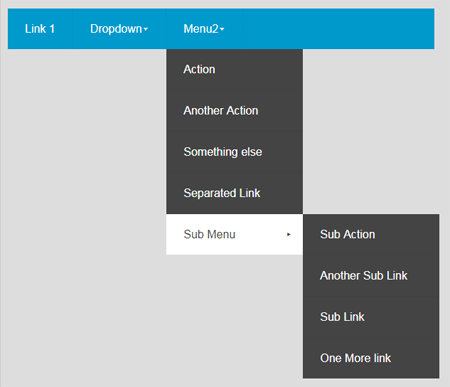
The responsive mobile/desktop menu is a drop down menu for station navigation via ords. You can modify the look and feel using a JSON config file or copying it directly into the appropriate property. The menu is responsive to screen size. When screen size is less than 1024px, the mobile click menu becomes available. Before you start, copy the .jar file to your modules directory. Restart the station and Workbench.
Are you looking for a cost effective way to manage and visualize data for all your customers? Why not have a look at View Builder ?
Before you start. Download the modules from our portal (see your order confirmation, which also explains licensing). Copy the modules file to your modules directory. Restart BOTH station and Workbench.
1. Copy the responsiveMenu-ux.jar file to your modules directory. 2. Open the module from your palette file. 3. Drag and drop the widget from the palette onto your px view.
The config is in JSON format. You can customise as needed. Below is the default config with examples. There are 2 themes: default and inverse. However you can override values as needed.
1. To help build your menu configuration use an online JSON editor like: https://jsoneditoronline.org/ Copy and paste the above JSON and modify.
2. After you have made changes to the JSON, set the config property value of the menu: IMPORTANT. You should remove all carriage returns and line breaks from the generated configuration before pasting. You can do this by using a text editor like Notepad++. In Notepad++ do CTRL+H (make sure extended Search mode is selected) to find and replace \r and \n with blank. This will remove all carriage returns and line breaks.
3. For the hyperlinks, valid ords must be used. e.g.: station:|slot:/Drivers/NiagaraNetwork/AHU1
back to more widgets...
Build Your Own dashboards and win Projects by showing data that increase value and reduces expenditure.
Home About Us Current Projects Affiliations Privacy Policy ECommerce Policy
View Builder IOT ™© Mobile Solutions N4 View Builder ™© Niagara PX Graphics
Software Development Consultancy Project Management Graphic Design Knowledge
T: +44 (0)800 511 8446 (UK) +1 888 207 4061 (US)
Copyright © 2025 Works Software & Engineering Ltd. All rights reserved.