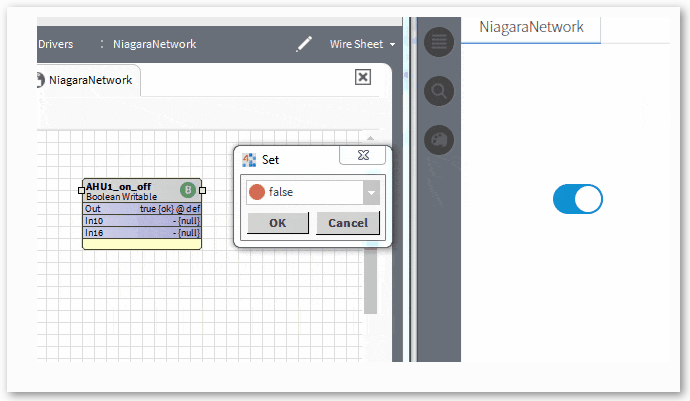
The toggle switch button has a few configurable properties that can be used to modify look, feel, and functionality. The widget binds to a Boolean Writable. You can control the value and get a real time update of its state. So if the boolean is true, the toggle will be off, and vice versa. Before you start, copy the toggleSwitchButton-ux.jar module file to your modules directory. Restart station and Workbench.
Are you looking for a cost effective way to manage and visualize data for all your customers? Why not have a look at View Builder ?
Before you start. Download the modules from our portal (see your order confirmation, which also explains licensing). Copy the modules file to your modules directory. Restart BOTH station and Workbench.
1. Copy the toggleSwitchButton-ux.jar file to your modules directory. 2. Open the module from your palette file. 3. Drag and drop the widget from the palette onto your px view.
The toggle button has one main property, the ord. It should point to a boolean writable.
This can be an absolute ord, e.g. station:|slot:/Drivers/NiagaraNetwork/AHU5 OR relativized ORD e.g. slot:AHU5 Optionally, a second point has been added if you want the status of the value to come from another point. But always the first ord binding will be controlled.
The button has the following styles:
The button has the following sizes. To set the size, set the button size property either toggle, toggle-sm, or toggle-lg
back to more widgets...
Build Your Own dashboards and win Projects by showing data that increase value and reduces expenditure.
Home About Us Current Projects Affiliations Privacy Policy ECommerce Policy
View Builder IOT ™© Mobile Solutions N4 View Builder ™© Niagara PX Graphics
Software Development Consultancy Project Management Graphic Design Knowledge
T: +44 (0)800 511 8446 (UK) +1 888 207 4061 (US)
Copyright © 2025 Works Software & Engineering Ltd. All rights reserved.