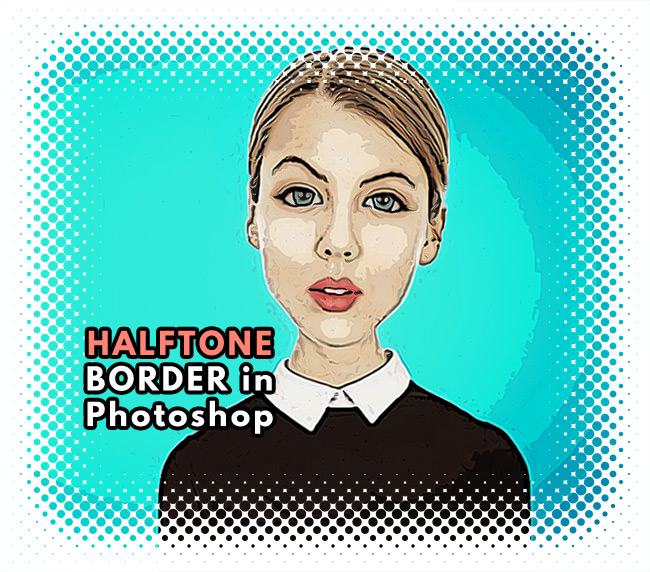
Learn how to create a decorative halftone border in Photoshop . If you want to add a cool frame or a fancy border to a photo in Photoshop, you can use this halftone effect.
Halftone borders work great with comics images and comic book effects.
To make a comic photo effect you can use the Posterize adjustment layer or you can add a Filter > Artistic > Poster Edges filter. You can also check out this free Posterize Photoshop action from PhotoshopSupply.
Open a photo in a new PSD file.
Create a new layer and call it Halftone Border . Fill this layer with color black.
Add a Inner Glow layer style to the Halftone Border layer.
Right click on the Halftone Border layer and choose Convert to Smart Object . Right click again and choose Rasterize Layer .
If you want a pre-made halftone border, you can download this free halftone border texture from Textures4Photoshop. Anyway, I will show you how to quickly create your own halftone border.
Go to Filter > Pixelate > Color Halftone . Choose the Max. Radius depending on your canvas size.
Set the blend mode of the Halftone Border layer to Screen if you want a white halftone border. Set the blend mode of the Halftone Border layer to Subtract if you want a black halftone border.
If you want to add some comic elements like speech bubbles or comic sound effects you can download these free cartoon effects in PNG format.
In you don't have Photoshop, use the MockoFun 's photo editor to create a halftone photo effect.
If you want to learn how to add border in Photoshop check out this quick tutorial for beginners.
BONUS: you get a free Photoshop frame action that includes 9 actions for framing photos.
If you don't have Photoshop, you can try MockoFun online photo editor which is a free Photoshop alternative. MockoFun is a great tool for magical photo editing online. It has lots of cool features that you can use for free.
Make your pictures more creative in just a few easy steps! You don’t need advanced photo editing skills to frame a photo online.
TUTORIAL: So, if you want to learn how to frame photo online check out this quick tutorial. It's really simple to add frame to photo online. You can do it in 3 simple steps without advanced photo editing skills.
How to Put a Border Around an Image in Photoshop
Video Feedback Infinity Mirror Effect in Photoshop