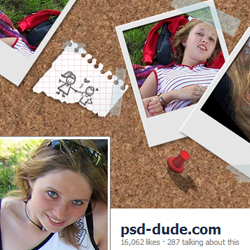
Learn how to create a Facebook Timeline Cover in Photoshop using these pretty simple yet creative ideas. To help you with these process I have added a free Facebook cover PSD that you can use as template . All you have to do is to add your Facebook profile photo and your cover image inside the smart objects. The Facebook PSD template is easy to edit and customize. So have fun and don't forget to upload your results.
Today we'll create a Facebook cover in Photoshop using photo frames, paper textures, sticky notes and other collage effects. First you have to download our Facebook Cover PSD mockup . The PSD file contains two easy to edit smart objects with the cover photo and the profile photo in the right sizes. All you have to do is to replace the two objects with your own design. So let's start.
Open the PSD mockup file and inside you will find two smart objects called (Replace this) Cover Photo and (Replace this) Profile Photo . The Facebook cover size is width 815 pixel and height 315 pixels. The Facebook profile photo size is a 160 pixels square.
Your profile picture helps people recognize you on Facebook. To add a profile picture or change your current profile picture you have to go to your Timeline and hover over your profile photo. Click Edit Profile Picture to edit your photo. The size for this image is 160x160 pixels saved as JPG or PNG format.
Double click on the (Replace this) Profile Photo thumbnail to open the smart object. Inside you can add yur image. For this tutorial I will use this teenager girls stock image.
A cover photo is the larger photo at the top of your Timeline, right above your profile picture. Like your profile picture, cover images are public, which means anyone visiting your Timeline will be able to see them. The size for the cover photo is 851x315 pixels and it must be less than 100 kilobytes. The format for this photo is JPG or PNG.
If you upload an image that's smaller than these dimensions, it will be stretched to this larger size. The image you upload must be at least 399 pixels wide and 150 pixels tall.
Now let's create the design for the Facebook profile photo . Open the (Replace this) Cover Photo smart object and inside add your design. I will use a cork texture to display some photos, sticky notes and other elements.
Download this polaroid PSD file and use the same image and display other parts from the photo using the clipping mask called "your image ". Simply drag and drop the clipping mask.
To make the cover image more interesting you can add different sticky notes , different colors and sizes. You can use notebook pattern to texturize the paper. And also you can add some scotch tape shapes on the polaroid photo frames and on the paper notes.
For the final touches I adde some push pins and some doodle sketch brushes , but you can use and creative idea that you might have. So here is the final result for the Photoshop Facebook cover design.
Create a Tattoo in Photoshop
Glitter Sparkle Text Effect in Photoshop