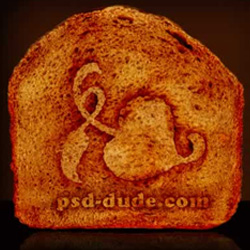
Learn how to create a logo in Photoshop with a toasted bread effect . It works beautifully for text, shape and so on. All you have to do is find a bread texture and put the logo on top. Use the Burn Tool to create the toasted effect; ready in just a few minutes.
Step 1 – Open the Background
Open a photo with a bread slice and if it is not toasted (it is recommended not to be toasted) .
Go to Image - Adjustments - Color balance and do the following settings.
Shadows: 30;0;-15 Midtones: 45;0;0 Highlights:20;0;-10
You can make another settings it depends on how is your bread looking.
Now duplicate this layer .
Step 2 – Add your Logo
Draw a logo or choose Custom shape tool and choose a shape from the list. I choose Hedere 2. For this shape you need to go to Blending Options and for Stroke set 2 px and color brawn.
Step 3 – Add Toasted Effect
Now merge the 2 layers , the one with the shape and the Copy of the bread. With the Magic wand tool select the Hedera shape and delete its content.
NOW it is time for a little inspiration…take the Burn Tool and brush 15, range: shadows, exposure: 10% and start burning the lines of the Hederea shape. Do this many times until it starts looking like toasted bread. Remember that the toasted bread it is not equal so you burn in some places more in some places less. Go to the other bread layer and burn a little…you can also dodge the both layers to create contrast areas like i did…
Now as you can see we have a nice hedera logo on the bread but its shape is too obvious like it was drawn not toasted. So go to Filter - Liquify - and with the Forward Warp Tool , brush size 7 , go up and down making the hedera shape not so obvious.
Step 4 – The Background
Now the final touch. As you can see the cropping is not perfect so adjust this aspect with a round shape Eraser Tool .
Use the same technique presented in the previous steps to write your name website , company , etc Add a nice background , add also a horizontal surface like a table or something. Use black color.
Than you can duplicate the bread , flip it horizontally and lower the opacity ... it will give a nice reflection on the dark surface.
Photoshop Toasted Bread Effect
Alice in Wonderland drinking tea in the royal courtyard
The Mad Horror Clown