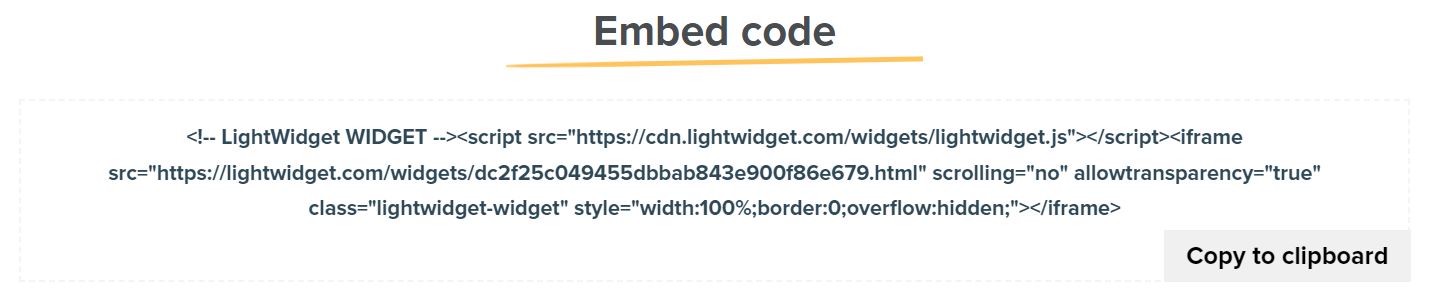
Widget embed code is a piece of HTML code generated when you create a widget on our website. You must copy that code to your website or blog to display our widget. Here is what our example widget embed code looks like:
It contains three parts – comment tag, script tag, and iframe
The initial segment of our widget embed code is the comment tag. This information proves useful for web developers, especially during debugging processes. It’s important to note that the comment tag is not mandatory, and you can exclude it if desired.
Including the script tag is crucial for two reasons:
If you omit this tag, our widget will not display the entire content. You can fix that by manually setting the widget’s height in your styles. Another consequence of omitting this tag is that if you have set the click action to “Open lightbox,” the lightbox will not load properly.
A commonly asked question is whether it’s possible to copy the content of this script to one’s website instead of loading it from our CDN. The answer is yes. However, it’s important to note that we occasionally update this script to introduce new or improved functionalities. If you choose to store it locally on your website, please remember to update it periodically.
The iframe tag will load our widget. It is the essential tag. You will need it to see the pictures on your website. Below you will find the list of attributes.
This attribute points to your widget. It tells the iframe which widget file it should load. For feeds with the upgrade add-on, we use advanced CDN, which speeds up the performance and loading time of the Instagram widgets.
By default, the iframe tag shows a scrollbar. We are hiding the scrollbars by adding this attribute.
By default, the iframe tag has a white background. The best experience is when our widget has your website background color, which this attribute provides.
It is an optional attribute. It is helpful for development and debugging or extracting styles from the style attribute to your CSS files.
This attribute provides basic styling for the responsiveness and look of our widget. We remove some default styling from web browsers. If you wish, you can remove this attribute and add the following snippet to your CSS files: