If your widget is not updating with new pictures or videos, there might be a few reasons:
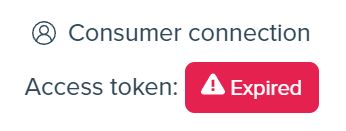
Check if the access token is not expired. Visit the list of your Instagram accounts or your Dashboard . Look for the Instagram account with the expired access token.
If your Instagram account has an expired token, you must refresh it. Click the Refresh token button to start the token refreshing process.
You can read more about refreshing tokens in this article – How to refresh access token?
When you connect your Instagram account to LightWidget, Instagram provides us with a unique key, named access token, which permits us to access certain information from your account. This information is required to update your widgets successfully with the latest posts. If the connection is expired, we can no longer update the Instagram widgets with the latest content.
If you have a free version of the widget, we check for new content on your Instagram account once per day. It may be up to 24h before your widget updates with new content.
If you have the widget upgrade add-on for your Instagram feed, we check more frequently for new posts. Pictures and videos posted to your Instagram account should appear in less than 30 minutes.
If you purchased the widget upgrade add-on, make sure that you use the proper widget embed code.
Go to the list of your widgets and click the Show more button next to the Instagram widget with Upgraded status.
It is significant for users with websites without SSL encryption (HTTPS) but who are using upgraded widgets or loading them from localhost.
Check your widget’s settings in the widget creator’s Content section. Please check if one of these options might be excluding the missing posts:
Some of these options might exclude the missing post from the widget. For example, the absent video post in a feed may be excluded because the “Show videos” option is disabled.
If you use the Hashtag filtering option from the Content section, ensure the tag is in the post description/caption on Instagram.
If the hashtag from this option is in the comment section instead of the caption, the post will not appear in the widget.
We use official Instagram APIs to pull the photos from your account. Currently, the APIs do not support collab posts.
If uploaded directly to your account, you tagged another user in collaboration; such a post will usually appear. If another user posts and adds you as a collaborator, it will not appear in the widget. There are some exceptions to that rule, not disclosed by Facebook/Instagram. We will need to wait for their devs to add the proper support for the collaboration posts before they appear in our widgets correctly.
This case is very similar to the missing collab post. The official Instagram APIs still need to support the pinned posts properly. Pinned posts will appear in our widgets, contrary to the collab posts. However, they will not be pinned to the top of the feed, as in the application or on the Instagram website.
If nothing helps, please create a support ticket on our support page. We will check out what is going on:)