Making positive changes to driving behavior is an important step in cutting automotive accidents and wasted fuel during the trip. FMB Blue-tooth application will help to monitor driver behavior and receive notifications about possible violations in real-time!
For application to work and detect settings correctly – FMB must be configured correctly. The driver is notified about the event as soon as it is being detected in the device. So the driver may adjust his driving behavior accordingly. The application has not only the visual display of the event but also a sound notification, so the phone screen may be even off. Events are generated according to FMB device configuration, so make sure ECO Driving, Idling detection, Overspeeding, and High RPM features and events are enabled. NOTE: High RPM event is available from FMB001/FM3001, FMB1 series devices with connected LV-CAN200, ALL-CAN300 adapter, or FMB1/FMB9/FMB2/FMT100 series devices with connected OBDII Dongle .
In the trip type menu you can make:
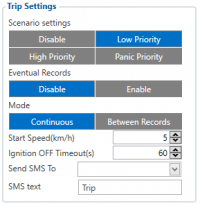
In the history view, you can view all recorded trips. If the trip has was completed with the application still communicating with FMB device – in history it will be marked by the blue line. If the device disconnected during a trip from the FMB for a long period of the timeline will be yellow. Usual cases for trip disconnection could be leaving the vehicle before the trip was completed by FMB configuration. It can be adjusted by Trip parameter Ignition OFF timeout in FMB configuration.
For EOL policy please refer to link here .