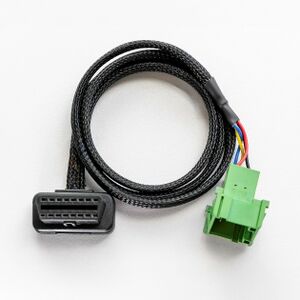
Teltonika OBD devices are able to read data from heavy duty vehicles. With the OBD to FMS adapter, clients are able to connect OBD devices to their heavy duty vehicles which have FMS female connector (usually located under the front panel). Cable is only applicable with the European truck.
DISCLAIMER: PLEASE MAKE SURE THE FMS PINOUT OF YOUR HEAVY DUTY VEHICLE IS AS REFERRED ON THE PROVIDED PINOUT SCHEME. IN CASE OF INCORRECT PINOUT PLEASE CONTACT YOUR HEAVY DUTY VEHICLE DEALERSHIP. THE CLIENT IS RESPONSIBLE FOR ALL THE ISSUES, WHICH MIGHT OCCUR BY INCORRECT INSTALLATION.
NOTE: Please use OBD devices with the latest firmware which has implemented J1939 protocol support.
Even though the FMS cable is standardized cable – its placement in the vehicle might differ depending on manufacturer and depending on vehicle trim level.
These examples identify the most common locations for the FMS plug.
1. Connect your OBD device to PC via USB or Bluetooth. 2. Open Teltonika Configurator and find your device in the list. 3. Select your device from the list. 4. Navigate to System and under System Settings Enable Codec 8 Extended protocol. 5. Open OBD II section on the left. 6. In General -> OBD II Settings -> OBD Feature select ELD . 7. In OBD VIN settings -> VIN Source select prefered source. Some heavy duty vehicles may not automaticly provide VIN number, in that case we recommend to setup VIN manually. 8. Save the configuration by pressing Save to device on the top. 9. New section with J1939 parameters can be found in ELD section on the right bottom.
The full supported parameter list for OBD devices can be found in the following pages:
This functionality requires the latest OBD configurator and firmware for optimal performance.
For more information about OBD-II to FMS adapter specifications and ordering, please visit OBD-II TO FMS ADAPTER web page.