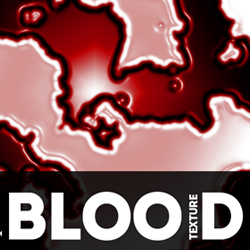
In this Adobe Photoshop tutorial we will learn how to create blood splatter texture from scratch using filters. The result is a pretty realistic bloody texture effect that can be easily customized using different settings for the smart filters. Starting from this texture you can create your own seamless blood texture ; learn how to do it from these tutorials for beginners.
In this quick tutorial we will learn how to create realistic liquid blood texture in Photoshop using some basic filters and adjustments. Let's take a quick look at the final image that we will create.
Let's start by creating a new PSD file; you can choose any size you want. Fill the first layer with color white. Name this layer Blood Texture .
Make sure the Foreground Color is set to white and the Background Color is set to black. Go to Filter > Render > Difference Clouds .
In this step we'll add a non-destructive Threshold adjustment by using the Create new fill or adjustment button found on the layers tab. Set the level of the Threshold to 128 and also the Fill to 45%.
Select the two layers, Blood Texture and Threshold , and convert them into a smart object so that we can be able to modify the result later on. Go to Filter > Blur menuy and choose Gaussian Blur .
Now go to Filter > Artistic menu and choose the Plastic Wrap filter.
You can add another Gaussian Blur smart filter with a small size radius if you want a smoother result. From the Create new fill or adjustment menu choose Gradient Map .
For the gradient map you have to choose a lighter and a darker tone of red like shown in the preview. Don't forget to set the blend mode of the Gradient Map adjustment to Overlay .
From the Create new fill or adjustment menu choose Curves .
In this step you have to apply a Brightness/Contrast adjustment if you want to obtain a more vibrant color and more contrast.
So here is the final result: blood texture made from scratch in Photoshop. You can customize the blood liquid stains simply by adjusting the filters that we used. If you want you can add a Hue/Saturation adjustment to create green alien blood .
Write in Sand Summer Beach Photoshop Tutorial
Stargate Ori Character Brought to Life in Photoshop