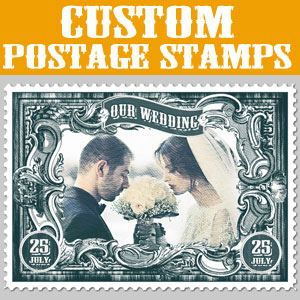
Create custom postage stamps using your own images and photos. For making the postage stamp tutorial I will use a free psd mockup . So. you will be able to create old postage stamps in just a few minutes.
Custom postage stamps can be used in so many design projects. For example you can make beautiful wedding postage stamps to remind you of that special day.
In this tutorial you will learn how to make your own custom postage stamps in 5 minutes. You can create beautiful wedding postage stamps for example.
To create custom postage stamps I will use this awesome Postage Stamp Mockup from PhotoshopSupply. So, download the free mockup before you start the tutorial!
Double click on the thumbnail of the "ADD YOUR IMAGE INSIDE" smart object to open it. Inside you can add your photo .
Save the smart object and close it to see the result.
You can edit the postage stamp and change the color; use the "CHANGE COLOR TONES" adjustment layer. Double click on the layer thumbnail to open the adjustment. Replace the Photoshop gradient using the colors that you like.
You can edit the text layers easily. Let's type "Our Wedding" on the main text and the day of the wedding.
You should note that the text follows a wavey shape. Making a text follow a path in Photoshop is sometimes tricky. I know it took me a while to learn this. If you're having troubles creating curved text or wavy text in Photoshop, you can check out the online text editor features of MockoFun . You will be able to create curved text, wave text, spiral text and all sorts of other text effects quickly in your browser. And it's FREE!
So, now you know how to create custom stamps in Photoshop using your own photos.
If you want to make rubber stamps you can try this premium Photoshop action. Use your photos to create custom rubber stamps in 1 minute!
If you don't have Photoshop, you can try MockoFun online photo editor which is a free Photoshop alternative. MockoFun is a great tool for cool photo editor online. It has lots of cool features that you can use for free.
Make your pictures more creative in just a few easy steps! You don’t need advanced photo editing skills to frame a photo online.
TUTORIAL: So, if you want to learn how to frame photo online check out this quick tutorial. It's really simple to add frame to photo online. You can do it in 3 simple steps without advanced photo editing skills.
If you want to learn how to add border in Photoshop check out this quick tutorial for beginners.
BONUS: you get a free Photoshop frame action that includes 9 actions for framing photos.
Creating A Cartoon Rainbow